
Participa en nuestro próximo seminario web «¿Se puede confiar en los datos medidos?», que tendrá lugar el 27 de octubre de 2026 a las 10:00 h CET. Inscríbete aquí
Hace aproximadamente un año, lanzamos Solargis Evaluate, que incluye funciones para la evaluación de emplazamientos complejos, el diseño de sistemas fotovoltaicos, la simulación del rendimiento energético, el análisis y la generación de informes, todo bajo un mismo techo.
Nuestra última versión Evaluate 2.7 amplía lo que ya puede hacer en Evaluate, introduciendo importantes mejoras en el diseñador de sistemas fotovoltaicos, el análisis de datos y los informes financiables. Conózcalas a continuación.
Diseñar centrales fotovoltaicas en terrenos irregulares a menudo implicaba hacer concesiones. Muchos equipos simplificaban el terreno o aceptaban hipótesis menos precisas sobre el trazado y el sombreado.
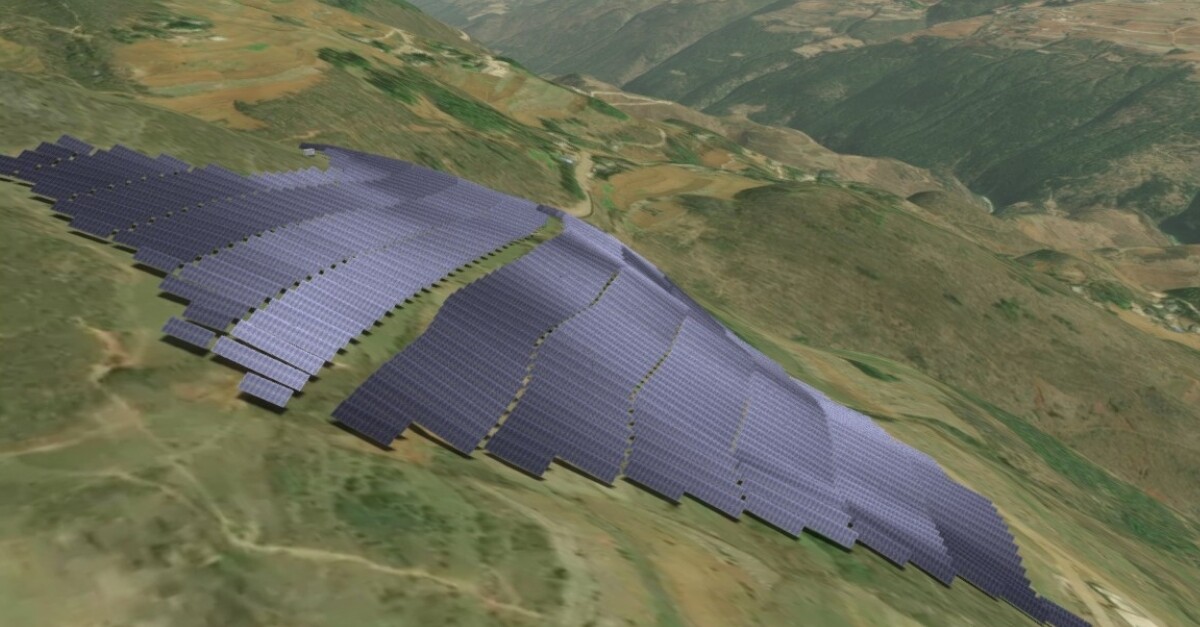
Anteriormente, introdujimos el diseño fotovoltaico adaptado al terreno para sistemas de montaje fijo, que permite diseñar centrales fotovoltaicas que se ajustan a los contornos naturales del terreno sin aplanarlo. Ahora, estamos ampliando la misma capacidad a los sistemas fotovoltaicos de seguimiento también.
En el 3D Energy System Designer, las mesas fotovoltaicas pueden seguir las ondulaciones del mundo real respetando el espacio libre y la orientación, lo que ayuda a mitigar los retos habituales de los terrenos complejos, como el riesgo de erosión, las obras excesivas en el terreno y la complejidad de la construcción.
Dado que las decisiones de disposición en terrenos irregulares influyen directamente en el sombreado y el comportamiento eléctrico, la simulación se ejecuta a nivel de celda, lo que permite realizar cálculos precisos de pérdida de sombreado entre filas incluso en emplazamientos complicados.
Con la nueva detección inteligente de colisiones, Evalate comprueba su diseño en tiempo real. Después de cada ajuste del diseño, la plataforma evalúa automáticamente las interacciones entre las mesas fotovoltaicas, el terreno y las unidades inversoras, y resalta las áreas problemáticas directamente en la escena.
Puede solucionar los problemas mientras diseña, antes de que se conviertan en rediseños de última hora, cuestiones de constructibilidad o decisiones de espaciado conservadoras que aumenten el coste.
El cableado es una de las partes más "silenciosamente caras" del diseño fotovoltaico, especialmente cuando las rutas se hacen más largas o más complejas debido al terreno. Evaluate 2.7 introduce una nueva función de diseño de cables que conecta dos elementos que van de la mano: la ruta que se dibuja y el cable que se dimensiona.
Al editar la ruta, la tabla de dimensionamiento actualiza los tipos de cable en función de la distancia y los requisitos eléctricos. El cálculo de la longitud del cable respeta la forma del terreno y la profundidad de enterramiento, y el dimensionamiento sigue la norma IEC 60287, ayudándole a seleccionar cables que cumplan tres criterios esenciales:
El resultado es un flujo de trabajo de diseño más alineado con las prácticas de ingeniería, al tiempo que se mantiene estrechamente conectado a sus cantidades y supuestos de CAPEX.
Evaluate ya incluye una validación integrada para detectar problemas como desajustes de tensión, ajustes incorrectos de los inversores o incoherencias en la conexión a la red.
En la versión 2.7, la validación es más proactiva: a medida que diseña, el sistema comprueba la validez en tiempo real, lo que le ayuda a identificar y resolver los problemas antes de que se conviertan en un riesgo para el rendimiento o en una repetición del trabajo durante la entrega del EPC.
Evaluate 2.7 añade una nueva sección de estadísticas del inversor en el análisis, diseñada para ayudarle a identificar rápidamente los cuellos de botella, cuantificar las pérdidas y tomar decisiones informadas para aumentar el rendimiento y el retorno de la inversión.
La nueva vista realiza un seguimiento de la frecuencia con la que su sistema funciona en cuatro estados clave:
Evaluate 2.7 refuerza la elaboración de informes con un nuevo diseño de la central eléctrica en 2D basado en vectores e integrado directamente en los informes del proyecto.
El diseño ayuda a las partes interesadas a verificar rápidamente los supuestos del emplazamiento y la ubicación de los componentes. Esto es útil no sólo para los ingenieros, sino también a la hora de explicar el proyecto a las autoridades de permisos, inversores, socios EPC y propietarios de tierras. El mapa admite zoom profundo para una inspección detallada e incluye contexto esencial como coordenadas, flecha norte, leyenda y mapa base.
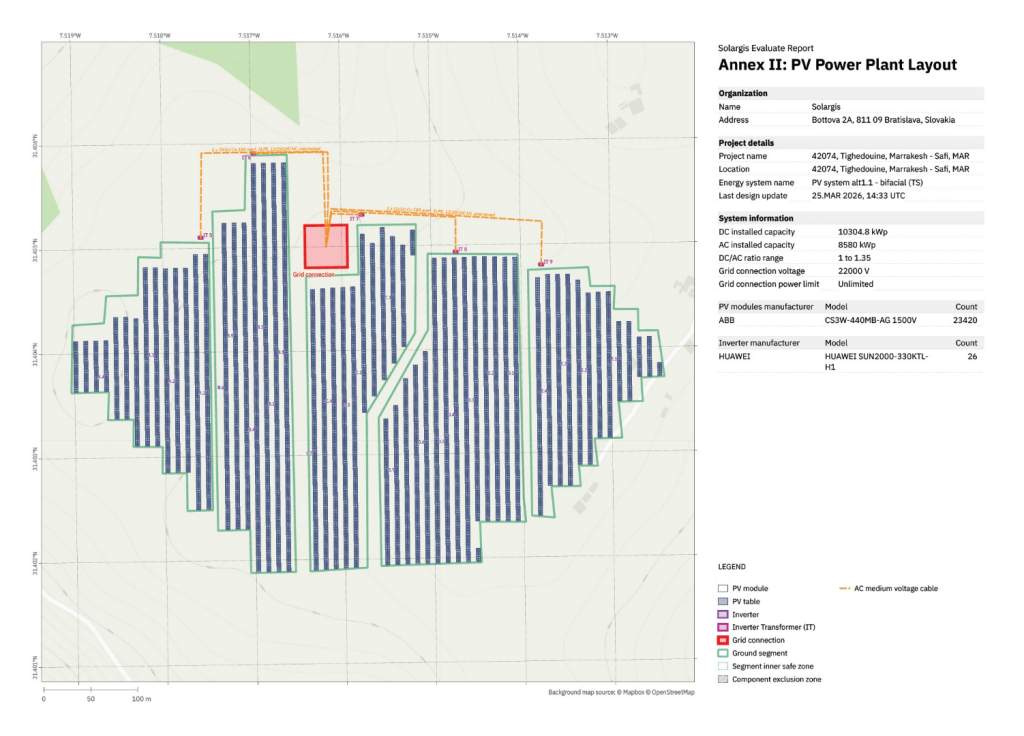
Y lo que es más importante, el plano está vinculado a un ID de informe único y firmado digitalmente. Cualquier tercero puede verificar que el plano se corresponde exactamente con el rendimiento calculado, las cantidades de la lista de materiales y los supuestos de CAPEX.
Descargue aquí ejemplos de informes y datos.
Solargis Evaluate 2.7 está diseñado para que sus decisiones de diseño sean más realistas, estén más alineadas con la ingeniería y sean más fáciles de validar, especialmente en los tipos de emplazamientos en los que las suposiciones tienden a acumularse: terrenos ondulados, trazados densos y entornos con restricciones de cuadrícula.
Con diseños adaptados al terreno, comprobaciones de colisión, diseño integrado de cables, validación en tiempo real, estadísticas de inversores y mejores informes visuales, esta versión le ayuda a pasar del concepto al diseño financiable con más confianza y menos sorpresas posteriores.
¿Desea más información? Póngase en contacto con nosotros.